
Use the following table from our manual to identify the error code on the readout of the display panel on the AC unit. Note that error codes can contain letters and number such as E8 or EB.
Search our knowledge base for the specific error code you are receiving for more guidance than the short summary provided here.
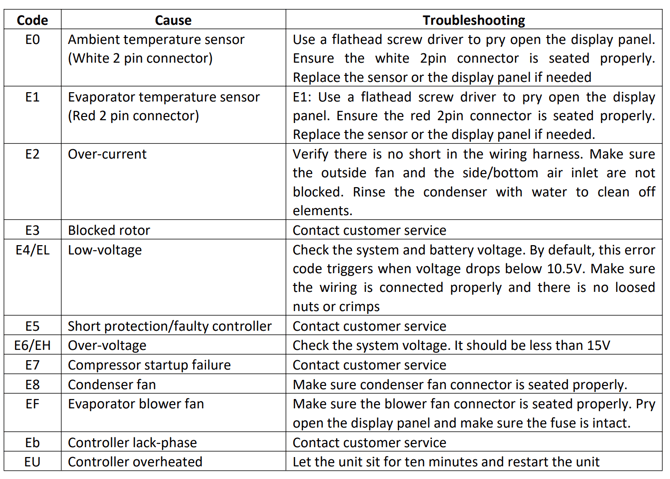
E0 – Ambient Temperature Sensor(White 2-pin connector):
Use a flathead screwdriver to pry open the display panel. Ensure the white 2-pin connector is seated properly. Replace the sensor or the display panel if needed.
E1 – Evaporator Temperature Sensor(Red 2-pin connector):
Use a flathead screwdriver to pry open the display panel. Ensure the red 2-pin connector is seated properly. Replace the sensor or the display panel if needed.
E2 – Over-current:
System pressure is high. Ensure the outside condenser fan and the side/bottom air inlet are not blocked. Rinse the condenser with water to remove debris, then power cycle the unit after letting it sit for 20 minutes.
E3 – Blocked Rotor:
Ensure the three terminal screws securing the compressor wiring are tight. Then, power cycle the unit after letting it sit for 20 minutes. Submit a ticket with Velit support if the issue persists.
E4 / EL – Low-voltage:
Check the battery voltage and measure the voltage at the terminal when the error code occurs. By default, this error code triggers when voltage drops below 10.5V. Make sure the wiring is connected properly and there are no loose nuts or crimps.
E5 – Short Protection / Faulty Controller:
Ensure the three terminal screws securing the compressor wiring are tight. Then, power cycle the unit after letting it sit for 20 minutes. Submit a ticket with Velit support if the issue persists.
E6 / EH – Over-voltage:
Check the system voltage. It should be less than 15V for the 12V model.
E7 – Compressor Startup Failure:
Ensure the three terminal screws securing the compressor wiring are tight. Then, power cycle the unit after letting it sit for 20 minutes. Submit a ticket with Velit support if the issue persists.
E8 – Condenser Fan:
Remove the shroud and make sure the condenser fan connector is properly seated.
EF – Evaporator Blower Fan:
Pry open the display panel and make sure the 4-pin blower fan connector is properly seated.
Eb – Controller Lack-Phase:
Ensure the three terminal screws securing the compressor wiring are tight. Then, power cycle the unit after letting it sit for 20 minutes. Submit a ticket with Velit support if the issue persists.
EU – Controller Overheated:
Ensure the outside condenser fan and the side/bottom air inlet are not blocked. Rinse the condenser with water to remove debris, then power cycle the unit after letting it sit for 20 minutes.
SP – Controller Disconnected:
Pry open the display panel and make sure the 4-pin compressor connector is properly seated. Power cycle the unit.