
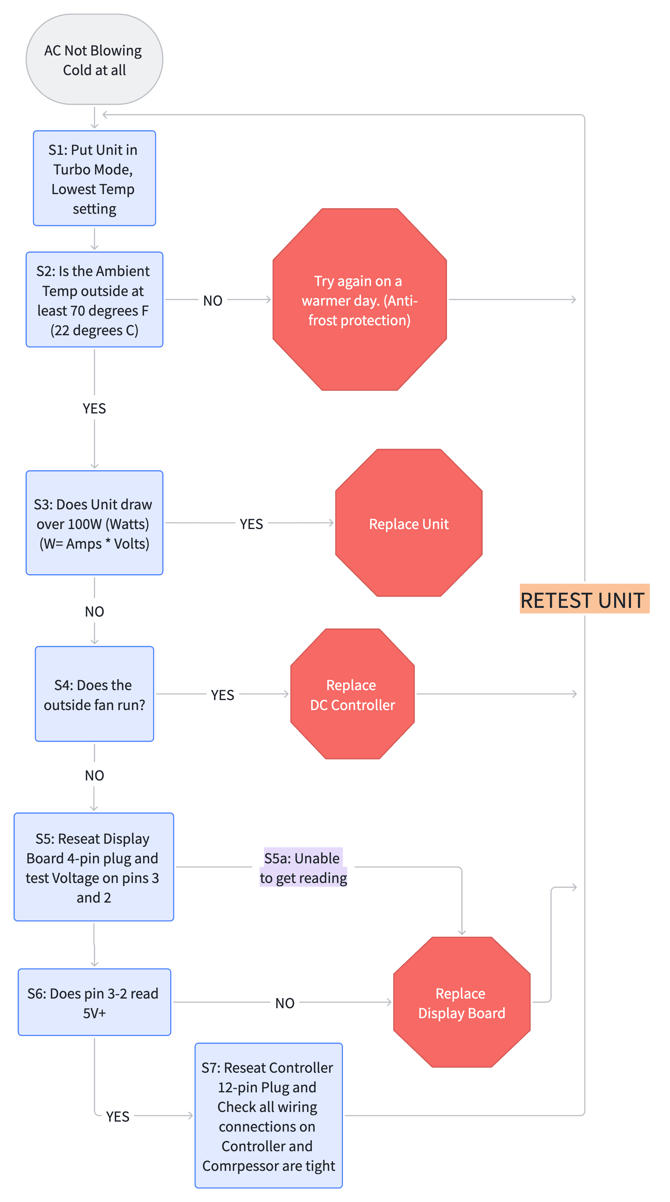
Below is a flowchart used to determine why a Velit AC unit may not be producing cooled air. Below the flowchart each step is broken down with instructions. Disclaimer: This flowchart should only be used as basic diagnostic guidance only.
Video: AC Not Blowing Cold
Additional Instructions for Each Step:
Step 1: Set the system
Set the unit to Turbo Mode and adjust the temperature to the lowest setting.
Step 2: Check the ambient temperature.
- Is it at least 67°F (20°C)?
If NO:
- Try again on a warmer day. The unit may enter anti-frost protection at low temperatures.
If YES:
- Continue to the next step.
Step 3: Power
Check the power consumption.
- Does the unit draw more than 100 watts?
If YES:
- The compressor is running.
- Likely causes: refrigerant leak or internal blockage.
- Action: Replace the unit.
If NO:
- The compressor is not running.
- Likely causes: electrical components or wiring issue — generally easier to fix and should take 5–30 minutes.
- Action: Proceed to the next step.
Step 4: Outside fan
Is the outside fan running?
- The outside fan is controlled by the DC controller.
If YES:
- The controller receives signals from the display panel.
- Likely issue: DC control problem.
- Action: Replace the controller.
If NO:
- Check the display panel that sends the control signal.
- Action: Continue troubleshooting.
Step 5: Display Panel Connectors
- Pop the display panel off and reseat the 4-pin connector.
- Check if the system draws more than 150W.
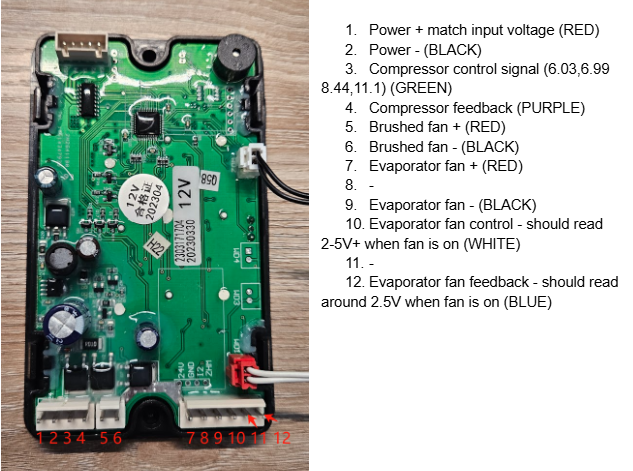
- Measure voltage between the black and green wires using a multimeter:
- Should read above 5V.
If the voltage is below 5V or the customer cannot get a reading:
- Action: Replace the display panel.
- Note: If the customer canThe issue may not actually be the display panel, but this is the first step to isolate the problem.
Step 6: Measure
Measure voltage at the display connector.
- Does pin 3 to pin 2 read 5V?
If NO:
- Action: Replace the display panel.
If YES:
- Continue to the next step.
See the image below, you want to measure voltage between pins 2 and 3 as shown at bottom of chart.
Step 7: Reseat and tighten
- Reseat the 12-pin connector on the controller. Check that all wire connections on the DC Controller and Compressor are tight. Retest Unit. If this still does not work, replace the DC Controller.